Lockstep
- Globally Available
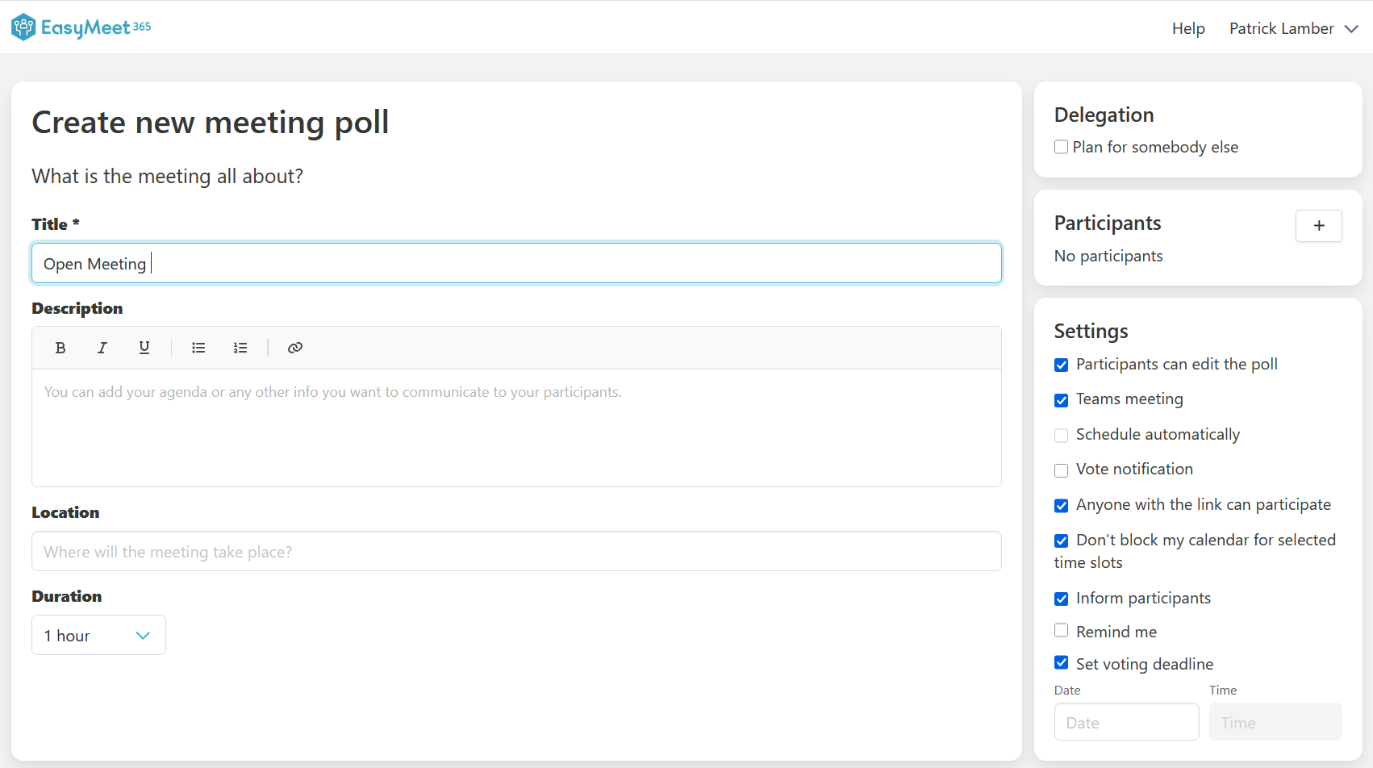
EasyLife 365 Meet now gives organizers and participants better control over participation, temporary calendar blockers, and poll closure timing.
What’s new?
-
Anyone with the link can participate
Organizers can now enable a new poll setting that allows authenticated users to add themselves as participants directly from the poll URL.
- Existing participant permissions stay unchanged.
- New participants can join and vote without organizer edits.
- Organizers keep full control because the setting is optional and disabled by default.
-
Don't block my calendar for selected time slots
Users can choose not to create temporary blocker entries for proposed time slots in their own calendar.
- This setting affects only the current user.
- Participants can decide their own blocker preference while voting.
- Organizers can set their own preference while creating or editing a poll.
-
Set voting deadline
Organizers can now define a deadline that automatically closes the poll when the selected date and time is reached.
- EasyMeet stops accepting new votes after the deadline.
- Poll closure is automatic at the configured time.
- If auto-scheduling is enabled and a winner exists, EasyMeet can schedule the meeting automatically.
How these updates will affect you
- You can collect votes from a wider audience without manually adding each participant first.
- You can keep your personal calendar cleaner by opting out of temporary blockers.
- You can end polls on time with an automatic voting cutoff.